
Accessing the Moodle LMS Platform Guide
Please note the following and read through the instructions below.
STUDENT LEARNING PLATFORM – MOODLE
Cornerstone Institute has officially transitioned from the previous FUNDA (Sakai) platform to a new Learning Management System (LMS) hosted on Moodle. All teaching, learning, assessments, resources and modules will now be accessed at: https://moodle.cornerstone.ac.za
🔐 HOW TO LOG IN TO MOODLE (IMPORTANT)
All 2026 registered students are issued a Cornerstone Student Email Account as part of their UniSIS registration.
👉 To log in to Moodle:
- Please ensure that you have successfully logged into your Cornerstone Student Email Account via the Google Chrome web browser https://mail.google.com/, to access your Moodle LMS Account
- Open a New Tab and Go to https://moodle.cornerstone.ac.za
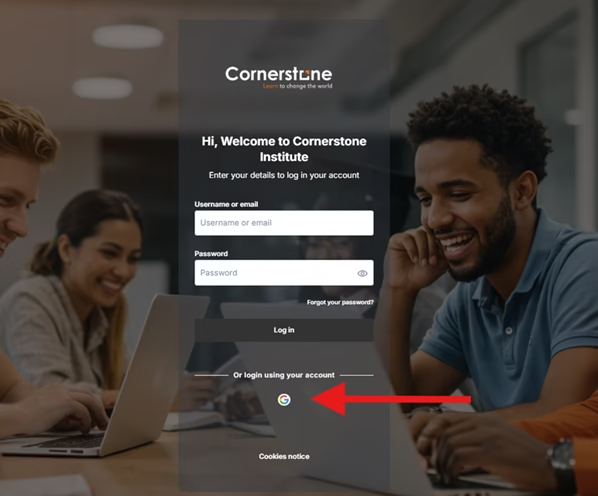
- Click the “Sign in with Google” icon
- If prompted, enter your Cornerstone Student Email Address and Password
⚠️ Important Notice:
- Do not enter a Username and Password directly on the Moodle login page.
- Access is via Google Single Sign-On (SSO)
- As indicated by the red arrow in the image provided above, click on the Google icon (the “G” logo).
📘 HOW TO LOCATE/FIND YOUR MOODLE MODULE SITES
- Click on the Profile Icon in the top right-hand corner.
- Click/Select the ‘Profile’ option.
- Click on the ‘Modules” tab.
- Scroll down to view all of the listed enrolled modules.